I built a tool that turns one sentence into a finished, lit pixel-art character. Here is what broke, and what I learned.
Every image below is an unedited capture from my automated tests. None of them is a mockup. What you see is what ships.

The result first
It took me ten days to build a pipeline that makes game characters the way a mint makes coins. You give it one sentence. It hands back a character with eight facing directions, 64 pixels tall, finished, lit, and checked. This is what comes out.

The look is the whole point, so I want to be exact about what you're seeing.
An AI image model drew the character from a sentence. Everything after that is mine. I wrote the finishing pass, which simplifies detail the way a careful pixel artist would. I wrote the lighting, and it is not a shader multiplying colors. It moves each pixel up or down a hand-built ladder of shades, and every ladder belongs to a 64-color palette I locked in on day one. I wrote the outline, a one-pixel edge that keeps the silhouette readable in any room.
And I wrote what I think matters most: the identity. Every solid pixel in the sprite maps to a named group of palette colors. So the renderer, the baker, the checking tools, and the lighting all know what they're looking at, even though none of them has ever been told about this particular character.
That one property is the whole story. Everything else followed from it.
Three findings
I'll state these up front, because they're the parts that apply beyond my project.
1. Automated checks are necessary, and they can't tell you if the art is good.
I built checks for everything I could measure: number of facings, cell size, clean transparency, palette coverage, how far the art leans. Every character I shipped passed every check. So did every character I threw away. In one batch, two of three candidates passed every automated test and failed the moment I looked at them. One lost its coat when it turned around, and turned into a different person. The checks can tell you when art is invalid. Only a person can tell you when it is wrong. So I run them in that order: worst facing first, phone view second, hero shot last.
2. A generator's colors are a suggestion. If you need to know what each pixel is, you have to supply that yourself.
Over three weeks, I asked the image vendor six different ways to tell me which part of the character each pixel belonged to. All six failed, and the last one failed for the clearest reason. When a hat band, a shirt, and a pair of sneakers are all painted the same gray, the information that separates them is not in the image. No math, no clustering, no cleverness can recover something that isn't there. The fix wasn't smarter guessing. It was making the color itself the label, so that asking "what is this pixel?" is a lookup, not a guess.
3. If every color belongs to a named ladder, the rest of the system works on art that didn't exist when you built it.
This is the payoff. Once generated characters used the same color language as my hand-drawn ones, with every pixel an exact palette color and every color on a ladder, my lighting, finishing, normal maps, and baking all worked on the new art without a single change. The art pipeline changed three times. The renderer never noticed.
The rest of this piece is how I got there, in the order it happened, including the turns that went nowhere.
I. The palette came first
The decision that shaped everything came before I'd drawn a single sprite. I locked the game's palette at 64 colors, using a well-known pixel-art palette from the community, and I made it the one thing that never changes. No edits, ever. The palette has two gaps. I wrote them down and treated them as rules to design around, not flaws to patch.
On top of the palette I built a library of named ramps. A ramp is a short ladder of neighboring palette colors that shows one material going from shadow to light. Skin, cloth, leather, hair, metal: each one is a handful of colors, picked and ordered by hand, and no two ramps share a color. The build checks that automatically. If two ramps claim the same color, the build fails with an error code. It has failed on me more than once for exactly that reason.

Two things fell out of this. First, every pixel in a valid sprite has an address. It isn't just a color. It's a ramp and a step on that ramp, like "cloth, third shade from dark." To the renderer, the sprite file is a map of parts with a picture painted on it.
Second, the palette already had a layout. Its 63 non-outline colors fall into thirteen runs of neighboring values: browns to blondes, one long run of blues, a few six-step grays. The people who designed the palette years ago put that order there. Keep it in mind. It becomes the ending.
II. Lighting that can't change a color
My first try at lighting sprites was the standard one. I borrowed the surface directions from a 3D model and used ordinary lighting math. It went the way you'd expect. The directions came from a mismatched mesh, so the inside of a 3D hood ended up across the character's face. Flat directions were better, but colored room lights still multiplied the art into dark, muddy patches. A navy coat smeared into a color that isn't in the palette.
So I started over with a rule instead of a technique: the original image is the neutral baseline. Under one fixed reference light, the rendered sprite has to match the original file exactly, pixel for pixel. Lighting is allowed to do one thing only. It can move a pixel to the next shade on its own ramp. It can never recolor, never skip a step, and never touch the outline.


I still use surface directions, but I draw them by hand for each facing in the sprite's own flat frame, so depth reads correctly as the light moves. They can only choose among shades the palette already has. The result behaves like hand-placed shading in classic pixel art, because that is what it is: palette shading, picked frame by frame by the light.
I got this wrong the first time, and my own review caught it. The first capture looked almost unlit. I redid the calibration against a measured test light instead of guessed numbers. The fix mattered less than the habit it started: every visual claim in this project ends in a saved capture, never in an argument.
III. Teaching the machine to make characters
With the display rules settled, the next question was production. Could a machine make characters that follow them?
My first answer was to draw every character by hand and let the pipeline's only job be not ruining the art. That was honest about the cost. A human face at 64 pixels is the scarcest thing in pixel art, and I needed characters at the speed of a sentence, not a weekend.

So I tried generating them. I send a sentence to the vendor's image service, limit it to my palette's colors, snap what comes back to the palette, and run the checks. The first full character came back as three candidates. Two were rejected, both at the back facing, which my review order predicts is the weakest view. One lost its coat when it turned. One grew bare skin where the skull should be. The third shipped. On the number that matters, the share of pixels my lighting can move, it landed within two points of the hand-drawn hero it replaced.

In that same batch I ran into finding #2 for real. I asked for pale blonde hair and gold trim. I got silver hair and ten pixels of gold trim across eight facings. Meanwhile 29% of the character's pixels sat on the "boots" ramp, because the generator had painted the coat out of boot leather.
My limit told the vendor which palette colors it could use. It said nothing about where. The result was still technically valid. Every pixel had an exact address, and lighting stepped along real ramps. But the labels were the generator's choice, and the wrong parts were getting the wrong detail.
I didn't fix that yet. First I put the effort into the look.
IV. The look of the thing
Generated pixel art has a signature. The detail is too sharp, there's speckle noise along the edges, and it feels like a model that has seen every pixel-art dataset and never held a pencil. The look I wanted was the soft, simplified finish of a careful artist cleaning up a sprite. A community tool already did that, and when I ran it on my art by hand, I wanted to keep the result immediately.
My pipeline couldn't use it, and the reason is worth spelling out. My art is a map of parts, so a filter that treats the whole image the same has no idea which pixels it's allowed to move. If a cleanup crosses a part boundary, it quietly repaints a boot as cloth. The renderer will believe it and light it as cloth forever.
My first fix was a masked version: clean up, but only inside part boundaries. It was gentle, careful, and tested, and it looked wrong. It protected the labels and lost the look, because the look lives on those boundaries. The soft finish folds the hat into the hat band, erases the stitching on a sneaker, and merges four shades of coat into three. The honest lesson: I built the wrong filter perfectly, and the pictures told me so long before the tests did.
My second fix dropped the mask. It finishes the whole image, with a mirrored 2×2 open/close pass on each facing that keeps the transparency clean. Then it works out the addresses again from the finished image. It refits the outline, snaps to the palette, recounts the color runs, and rebuilds the surface directions. The finish stopped caring about labels because the addressing learned to follow the art instead of holding it back. (At the time, that re-derivation was a table for each character. It later became Section V.)

Two small additions finished the look. One is a dark one-pixel rim grown just outside the character's edge, so it stands out from busy rooms the way the baked inner edge already did. The other is a rim light that brightens the lit side of the contour from inside the silhouette, so the form survives backlighting. Both reuse the same single outline color. That's three outline effects in one color, and it reads as a decision, not an accident.
V. The addressing insight
This is where the story turns.
The endpoint I was using was the vendor's oldest. It was the only one that accepted palette-limited generation, and it was clearly the weakest. The vendor's newer models made better art. I tested three explanations for why mine lagged, and all three turned out to be wrong:
- "The palette limit is what hurts the art." No. Generating without it barely changed the output. The old endpoint was the problem, not the limit.
- "The bad faces are low-contrast." No. The measured spread of brightness was statistically the same on good faces and bad ones. I was measuring the wrong thing.
- "A better clustering method can work out ramps for each character from the new art." No, and it wasn't close. I measured one frame and found that 56% of the non-outline pixels wear a color that two or more materials claim. The hat band, shirt, shorts, and sneakers were all drawing from one shared pool of four grays. My addressing works by color, so no way of splitting up colors can give the shirt and the shorts separate rows when they're painted the same color. That's arithmetic, not a weak metric. The information isn't there. By my count, this was the sixth failed attempt to recover identity from finished art.
So I flipped the question. I stopped asking the art what it meant, and let the palette say it.
The palette's thirteen value runs, the same layout from Section I, became a second library of ramps. Now I generate on the strong endpoint with no palette limit at all. I snap the result to my 64 colors, then give every pixel the address of the run its palette color belongs to. A gray is a gray. The shirt, the shorts, and the hat band all darken together, and that isn't a compromise. It's the correct behavior for a shared neutral. Identity is no longer pulled from the art or demanded from the vendor. I read it off something a human designed years ago.

Finding #3 paid off here: the integration cost was zero. The new run groups plug into the same interface as my hand-built ramp library, merged when read and never written into the files. So the codec, the baker, the finishing pass, the surface-direction tool, and the shader all handled the first generated characters of this kind with no changes. Two characters, made and finished the same evening, passed the neutral rule with zero pixels changed under the fixed reference light.
The final review was the lit one, in the real room, on the real GPU. Under one directional light, the parts sit at different steps: crown lit, brim dark, chest a step above the sides, outer arms brighter than inner ones. Shared runs darken as one. One step darker, skin still reads as skin. I passed all three bars on captures, not on claims.
VI. What each step looks like
So far I've described the pipeline in words. Here is what it does to a character, stage by stage. These are the same eight facings of the same character at each step of the trip from a vendor's model to the game. My own code generated these images offline, from the same raw strip one of my generated characters actually returned.

Step 1: The raw generation. This is what the vendor's model returns from one sentence. You get eight rotations with unrestricted colors, no shared placement, no shared foot line, and edges that are already fraying. It's the weakest-looking image in this piece, and every character you've seen above was built from something just like it.

Step 2: The fit. Each facing is trimmed to its edges, centered side to side, and lined up on one shared foot line. The dark outline is drawn here, from the edge of the shape itself, so the vendor's color choices can never break the outline rule. The colors are still the vendor's. Nothing has been snapped to the palette yet.

Step 3: The finish. This is the soft pass: a mirrored 2×2 open/close simplification across the whole image, then a refit (cleanup can nudge the tips of the silhouette), then a snap of every solid pixel to its nearest of the 64 palette colors. This is the moment the character becomes mine. After this step, every pixel is an exact palette color with a known address, and the run count can read it.

Step 4: The normals. My code draws these from the finished color art. Each connected patch of one material gets a fixed height shape, with domes on crowns and folds on cloth, stored as a normal map. This is what lets directional light find the underside of a hat brim. It looks strange as a picture. It looks right in a lit room.
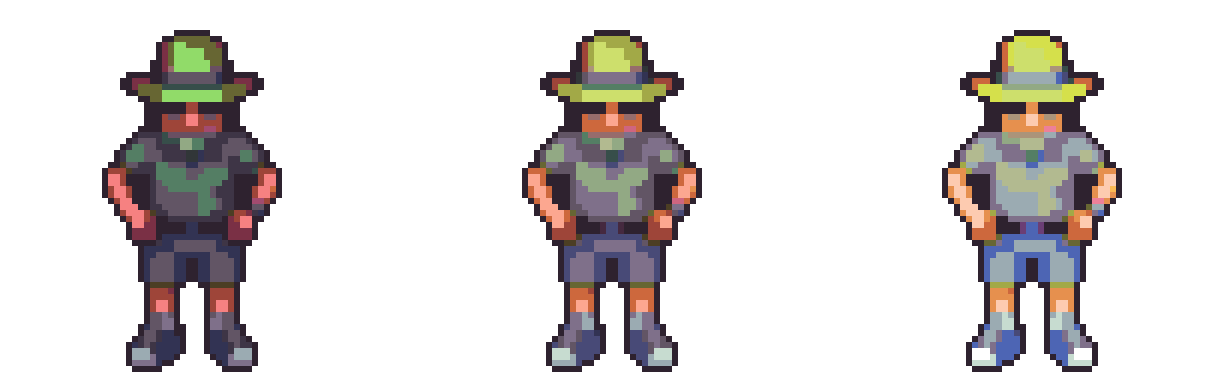
Step 5: The light. The same front facing at three light levels: half the reference, the neutral original, and half again brighter, all run through the same CPU path the shader follows. Nothing is recolored. Every pixel moves along its own ramp, the outline never changes, and at the neutral level the image is the original file, exactly.
Close: what the reference screenshots prove
Every gameplay image in this piece is a reference screenshot, one of 25 fixed scenarios captured in a locked container and compared pixel for pixel on every change. The habit that made the pipeline trustworthy also made this article easy to write. I had almost nothing to screenshot for it. The captures already existed, and they'd been telling the story the whole time. (The stage images in Section VI are the one exception. I generated those fresh from the pipeline's raw-strip test file, using the pipeline's own tools.)


That's the quietest thing the pipeline gives me, and the first thing I'd rebuild. When I accept a change, its screenshot diff is the character and nothing else. When I reject one, whether it's the wrong lighting, the un-softened look, or the candidate with no coat, a person made that call, because machines still can't see. Both facts are recorded in the same place, with the same images.
Here is what's still open. Composite characters, with layered, swappable parts on one body, are the next job, and nothing above is a claim about them. Today the pipeline stops at one mesh per character. The palette, of course, is ready.

Ten days. Seven design documents. Six failed attempts to recover what had to be supplied. Two wrong theories about image quality. One of my own designs proved wrong. Three characters generated, two rejected at the back facing, and 25 reference screenshots that all of it had to answer to. The palette owns the character. Everything else is downstream.